
Nissan Juke Hybrid Owners Manual | 2025
7.6.1.3. USB (Universal Serial Bus) rear power ports (where fitted)
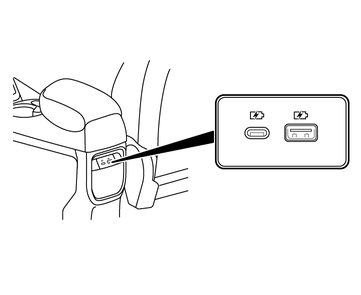
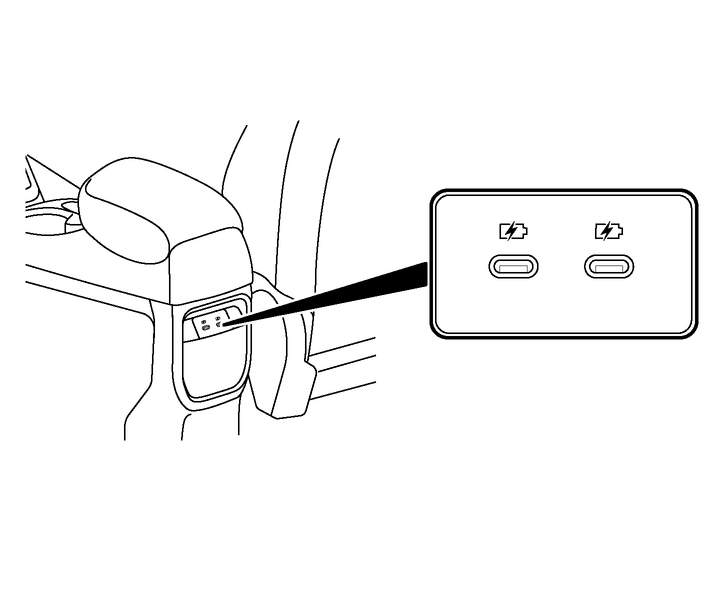

Do not connect, disconnect or operate the USB device while driving. Doing so can be a distraction. If distracted you could lose control of your vehicle and cause an accident or serious injury.

Do not force the USB device into the USB connection port. Inserting the USB device tilted or up-side-down into the USB connection port may damage the USB connection port. Make sure that the USB device is connected correctly into the USB connection port (some USB devices come with a
 mark as a guide, make sure that the mark is facing the correct direction before inserting the device).
Do not grab the USB connection port cover (where fitted) when pulling the USB device out of the USB connection port. This could damage the USB connection port and USB connection port cover (where fitted).
Do not leave the USB cable in a place where it can be pulled unintentionally. Pulling the cable may damage the USB connection port.
A USB power point (where fitted) is provided on the rear of the console box/armrest unit.
These ports are for power supply only. It does not support data transfer.
Type A includes USB-A port with 12 W and maximum output current of 2.4 A and USB-C port with 15 W and maximum output current of 3.0 A.
Type B includes two USB-C ports with 15 W and maximum output current of 3.0 A each.
Please note that actual output current will depend on the device connected to the port. The charger will provide the appropriate current value to the device connected based on the protocol used by the mobile device.