
Nissan Qashqai Owners Manual | 2024
4.3.3. Vehicle information display

When the ignition is switched ON, the vehicle information display may display the following screens if the vehicle is equipped with them:
1. [Home]
2. [Blank]
3. [Speed] (where fitted)
4. [Drive Computer] — [Average Speed] (Distance & Time)
5. [Fuel Economy]
6. [ECO Pedal Guide]
7. [Tyre Pressures]
8 .[Stop / Start]
9. [Stop / Start] (where fitted)
10. [4x4-i Torque Split] (where fitted)
11. [Navigation] (where fitted)
12. [Navigation] (where fitted)
13. [Compass] (where fitted)
14. [Audio]
15. Telephone screen (displays when there is an incoming call)
16. [Driving Aids] (where fitted)
17. ProPILOT Assist or ICC/Steering Assist (MT) (where fitted)
18. [Traffic Sign] (where fitted)
Warnings. Warnings will only display if there are any present. For more information on warnings and indicators, see
.19. [Settings]
To control what items display in the vehicle information display, see
.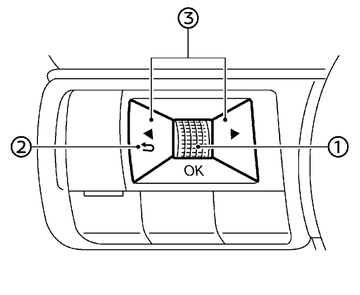
Switches for the vehicle information display are located on the left side of the steering wheel.
- Scroll dial - navigate through the items and change or select an item in vehicle information display. This scroll dial allows up/down navigation and push to select
 - go back to the previous menu
 - change from one display screen to the next (i.e. trip, Fuel economy)
The displayed images may differ depending on the model.