
Nissan Qashqai Owners Manual | 2025
4.14.2. Wireless charger (where fitted)
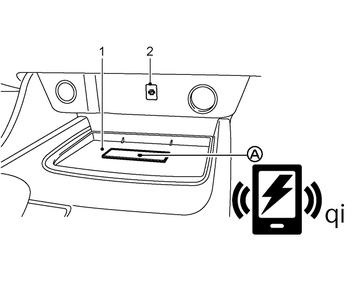
- 1 Charging pad
- 2 Indicator
- (A) < Qi > logo
The wireless charger is located on the front of the centre console. Lay the smartphone on the <Qi> logo (A) on the charging pad of the wireless charger. Charging will start automatically. The smartphone will be charged continuously while the ignition is ON.
Never put metallic materials between the wireless charger and a smartphone.
Those who use a pacemaker or other medical equipment should contact the electric medical equipment manufacturer for the possible influences before use.
Never put cloth over the smartphone during charging process.
Never charge a smartphone when it is wet.
Never put metallic materials or small goods such as a cigarette lighter, Intelligent Key or memory drive on the charging pad.
Do not put an RFID/NFC/credit card between the wireless charger and a smartphone. This could cause data corruption in the card.
Do not use the wireless charger with dust accumulated or dirt on the pad.
Do not hit the surface of the wireless charger.
Do not spill liquid (water, drinks, etc.) on the charging pad.
Do not use grease, oil or alcohol for cleaning charging pad.
Do not remove rubber mat (including non wireless charger mat).
Be aware that smartphone cases or covers may affect charging operation or cause the smartphone to become warm while charging.